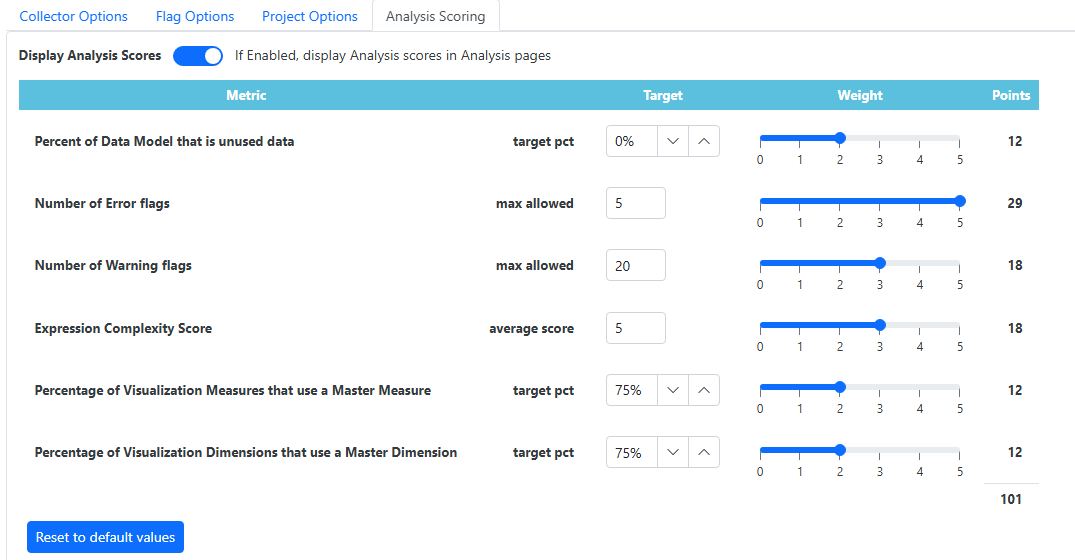
The Analysis Scoring page allows administrators to define a weighted scoring model to quantify the quality and health of a Qlik Sense application. Users can configure targets and relative weights for key performance and best-practice metrics, such as unused data percentages, flag counts (errors/warnings), and master item adoption. These configurations calculate a consolidated total score (e.g., 101 points), providing an objective benchmark for app optimization and governance.
Configuration Metrics
•Data Model Efficiency: Sets targets for the percentage of unused data to minimize memory footprint.
•Issue Thresholds: Defines the maximum allowable number of Error and Warning flags before the score is impacted.
•Complexity & Standardization: Weights the average expression complexity and the percentage of visualizations utilizing Master Dimensions and Measures.
•Weighted Scoring: Features interactive sliders (0–5) to adjust the relative importance of each metric, which dynamically updates the total point allocation.